Card Reference
The Klaude Console includes over 100 dashboard cards organized into categories. Cards can display live data from your clusters or demo data for evaluation.
Card Catalog Card Categories
Cluster Health (9 cards)
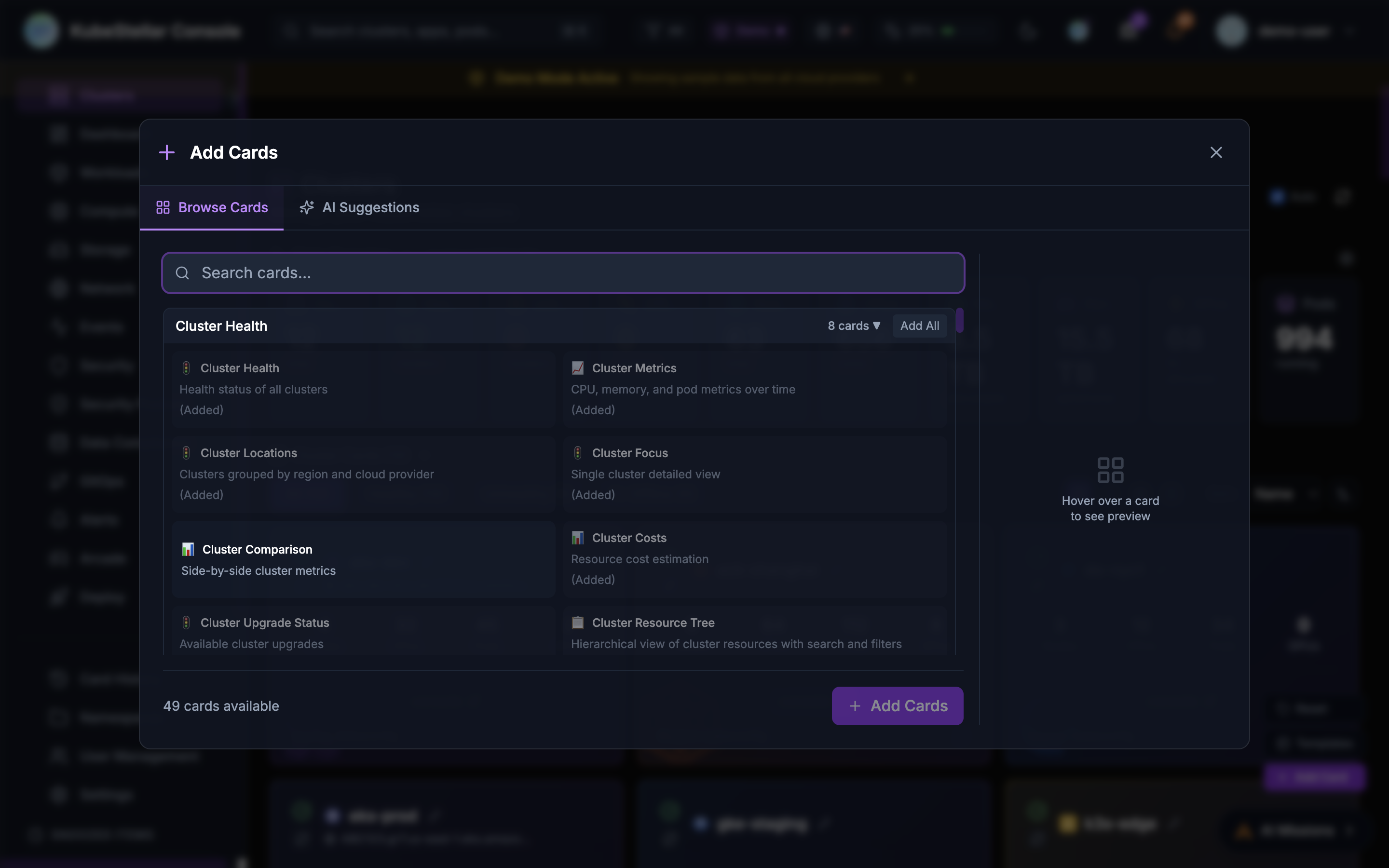
Card Description Data Source Cluster Health Health status of all clusters Live Offline Detection Monitors nodes and GPUs for offline/unhealthy status Live Cluster Metrics CPU, memory, and pod metrics over time Live Cluster Locations Clusters grouped by region and cloud provider Live Cluster Focus Single cluster detailed view Live Cluster Comparison Side-by-side cluster metrics Live Cluster Costs Resource cost estimation Demo Cluster Upgrade Status Available cluster upgrades Live Cluster Resource Tree Hierarchical view of cluster resources Live
Workloads (7 cards)
Card Description Data Source Deployment Status Deployment health across clusters Live Deployment Issues Deployments with problems Live Deployment Progress Rolling update progress Live Pod Issues Pods with errors or restarts Live Top Pods Highest resource consuming pods Live Workload Status Workload health overview Live Workload Deployment Multi-cluster workload deployment Live
Compute (8 cards)
Card Description Data Source Compute Overview CPU, memory, and GPU summary Live Resource Usage CPU and memory utilization Live Resource Capacity Cluster capacity and allocation Live GPU Overview Total GPUs across clusters Live GPU Status GPU utilization by state Live GPU Inventory Detailed GPU list Live GPU Workloads Pods running on GPU nodes Live GPU Usage Trend GPU used vs available over time Live
Storage (2 cards)
Card Description Data Source Storage Overview Total storage capacity and PVC summary Live PVC Status Persistent Volume Claims with status Live
Network (7 cards)
Card Description Data Source Network Overview Services breakdown by type Live Service Status Service list with type and ports Live Cluster Network API server and network info Live Service Exports (MCS) Multi-cluster service exports Live Service Imports (MCS) Multi-cluster service imports Live Gateway API Kubernetes Gateway API resources Live Service Topology Animated service mesh visualization Demo
GitOps (7 cards)
Card Description Data Source Helm Releases Helm release status and versions Live Helm History Release revision history Live Helm Values Diff Compare values vs defaults Live Helm Chart Versions Available chart upgrades Live Kustomization Status Flux kustomizations health Live Overlay Comparison Compare kustomize overlays Demo GitOps Drift Configuration drift detection Live
ArgoCD (3 cards)
Card Description Data Source ArgoCD Applications ArgoCD app status Live ArgoCD Sync Status Sync state of applications Live ArgoCD Health Application health overview Live
Operators (3 cards)
Card Description Data Source OLM Operators Operator Lifecycle Manager status Live Operator Subscriptions Subscriptions and pending upgrades Live CRD Health Custom resource definitions status Live
Namespaces (5 cards)
Card Description Data Source Namespace Monitor Real-time resource monitoring Live Namespace Overview Namespace resources and health Live Namespace Quotas Resource quota usage Live Namespace RBAC Roles, bindings, service accounts Live Namespace Events Events in namespace Live
Security and Events (3 cards)
Card Description Data Source Security Issues Security findings and vulnerabilities Live Event Stream Live Kubernetes event feed Live User Management Console users and Kubernetes RBAC Live
Live Trends (4 cards)
Card Description Data Source Events Timeline Warning vs normal events over time Live Pod Health Trend Healthy/unhealthy/pending pods Live Resource Trend CPU, memory, pods, nodes over time Live GPU Utilization GPU allocation trend Live
Klaude AI (3 cards)
Card Description Data Source Klaude Issues AI-powered issue detection Live Klaude Kubeconfig Audit Audit kubeconfig for stale contexts Live Klaude Health Check Comprehensive AI health analysis Live
Alerting (2 cards)
Card Description Data Source Active Alerts Firing alerts with severity Live Alert Rules Manage alert rules and notifications Live
Cost Management (3 cards)
Card Description Data Source Cluster Costs Resource cost estimation by cluster Demo OpenCost Cost allocation by namespace Demo Kubecost Cost optimization recommendations Demo
Security Posture (7 cards)
Card Description Data Source OPA Gatekeeper Policy enforcement status Live Kyverno Policies Kubernetes-native policy management Live Falco Alerts Runtime security monitoring Demo Trivy Scanner Vulnerability scanning Demo Kubescape Security posture management Demo Policy Violations Aggregated policy violations Live Compliance Score Overall compliance posture Demo
Data Compliance (4 cards)
Card Description Data Source HashiCorp Vault Secrets management Demo External Secrets Sync secrets from external providers Live Cert-Manager TLS certificate lifecycle Live Access Controls RBAC policies and auditing Live
Workload Detection (7 cards)
Card Description Data Source Prow Jobs Prow CI/CD job status Live Prow Status Prow controller health Live Prow History Recent Prow job runs Live llm-d inference vLLM, llm-d, TGI server status Live llm-d models Deployed language models Live ML Training Jobs Kubeflow, Ray training status Demo ML Notebooks Running Jupyter notebook servers Demo
Arcade (21 cards)
Fun games and entertainment:
Kube-Man (Pac-Man style)
Kube Kong (Donkey Kong style)
Node Invaders (Space Invaders)
Pod Pitfall (Pitfall adventure)
Container Tetris
Flappy Pod
Pod Sweeper (Minesweeper)
Kube 2048
AI Checkers
AI Chess
Kube Solitaire
Kube Match (Memory game)
Kubedle (Wordle style)
Sudoku
Pod Brothers (Mario style)
Kube Kart (Racing)
Kube Pong
Kube Snake
Kube Galaga
KubeCraft 2D
KubeCraft 3D
Utilities (4 cards)
Card Description Data Source Network Utils Ping hosts, check ports Live Mobile Browser iPhone-style web browser Live RSS Feed Read RSS feeds from tech sources Live Iframe Embed Embed external dashboards Live
Miscellaneous (4 cards)
Card Description Data Source Weather Weather with forecasts Live GitHub Activity Monitor GitHub repository activity Live Kubectl Interactive kubectl terminal Live Stock Market Ticker Track stocks with charts Live
Adding Cards
Click Add Card on the dashboard
Browse categories or search for specific cards
Click a card to add it to your dashboard
Drag to reposition, use the menu to configure
Card Data Sources
Live : Data fetched from your connected clustersDemo : Simulated data for demonstration purposes
Demo cards can be useful for:
Evaluating features before deployment
Training and
Showcasing capabilities